Best overall for straight-on viewing: a tilting TV mount. Best for changing viewing angles: a full-motion mount. Best for a close-to-wall setup: a fixed mount. This 2026 guide ranks the best TV mounts for large screens by room layout, adjustment needs, and installation requirements—not by an unsupported list of model names.
- The best tv mounts for large screens match your TV’s weight, VESA pattern, wall construction, and viewing position.
- Choose a tilting mount for straight-on seating when you need vertical angle adjustment.
- Choose full-motion for changing viewing positions; choose fixed when the screen can stay facing forward.
- Bestlinktek provides TV installation services; confirm your address, hardware responsibilities, and installation scope before booking.
Why this matters
A large screen needs more than a bracket with the right advertised screen-size range. Your mount must fit the television, attach correctly to the wall, and leave the connections usable after installation.
Bestlinktek is best for Raleigh–Durham homeowners seeking in-home TV installation rather than instructions alone. Review Bestlinktek for its services, then confirm the proposed installation scope and service availability for your address. National buying guidance does not establish nationwide booking availability.
For your 2026 purchase, start with the exact TV model and the room—not a mount’s promotional description. A bracket that fits the television can still be the wrong choice for your seating position or wall.
What makes the best TV mount for a large screen?
Use these criteria before comparing mount types:
- TV fit: Match the television’s mounting-hole pattern and weight to the mount’s published compatibility requirements. Screen diagonal alone does not establish compatibility.
- Wall attachment: Follow the mount instructions for the actual wall construction. Do not assume the included fasteners suit every wall.
- Viewing adjustment: Decide whether you need no movement, vertical tilt, or movement toward different seating positions.
- Connection access: Check clearance for plugs, power connections, and the TV’s port locations before choosing a low-profile bracket.
- Installation scope: Establish who supplies the mount, what cable routing includes, and whether electrical work or wall repairs require separate arrangements.
Keep those criteria separate. A mount’s adjustment features cannot compensate for an incompatible mounting pattern or an unsuitable attachment method.
Best large-screen TV mounts at a glance
These rankings compare mount designs, not specific products. Within every category, check the exact model’s instructions before purchasing.
| Rank and mount type | Best for | Standout feature | Key limitation |
|---|---|---|---|
| 1. Tilting mount | Straight-on seating with vertical angle adjustment | Changes the screen’s vertical viewing angle | Does not provide the same side-to-side positioning as full-motion |
| 2. Full-motion mount | Rooms with different viewing positions | Repositions the screen through an articulated arm | Requires careful clearance and cable planning |
| 3. Fixed mount | A permanent, forward-facing viewing position | Keeps the installation close to the wall | Limited adjustment and rear access |
| 4. Pull-down mount | A high mounting location that needs a lower viewing position | Moves the screen downward for viewing | Requires a clear movement path and model-specific clearance checks |
The default recommendation is tilting, not full-motion. Choose additional movement only when your room actually needs it; otherwise, you are adding an installation requirement without solving a viewing problem.
1. Tilting mount: best for straight-on viewing
A tilting mount lets you adjust the screen’s vertical angle while keeping the television facing substantially the same direction. It suits a room where the main seating area stays in front of the TV but some vertical adjustment is useful.
For a 2026 living-room installation, this is the starting point when you do not need to turn the screen toward another part of the room. Check the individual bracket’s tilt mechanism and clearance requirements rather than assuming every tilting mount adjusts identically.
Tilting mount pros
- Provides vertical angle adjustment without an articulated arm.
- Fits a viewing plan centered on one main seating area.
- Lets you adjust screen angle after establishing the mounting position, subject to the bracket’s design.
Tilting mount cons
- Does not replace side-to-side swivel when seating sits off to one side.
- Rear connection access depends on the bracket and television.
- Tilting the screen does not physically lower a television mounted too high.
Best for: You primarily watch from directly in front of the television and want vertical adjustment.
Before choosing this design, identify what you are correcting. A modest angle adjustment and an uncomfortable mounting height are different problems; do not use tilt as a substitute for planning screen placement.
Verdict: Buy a tilting mount when straight-on viewing is your default and vertical adjustment serves a clear purpose.
2. Full-motion mount: best for different viewing positions
A full-motion mount uses an articulated arm to reposition the television. Depending on the model, that movement includes extension, swivel, and tilt.
This design belongs in a room where the screen must serve different seating areas or turn away from its parked position. For large screens, check the actual movement envelope: the television’s edges, nearby furniture, and the wall all affect usable movement.
Full-motion mount pros
- Changes the screen’s direction for different viewing positions.
- Allows access behind the television when the design and installation permit extension.
- Provides more positioning choices than a fixed bracket.
- Lets you move the screen back toward the wall after viewing, within the mount’s design limits.
Full-motion mount cons
- Needs clearance throughout its intended movement path.
- Requires cable slack that supports movement without pulling connections.
- Advertised swivel does not guarantee the same usable angle with every television size.
Best for: You need to turn the screen toward a different seating area rather than merely adjust its vertical angle.
Route cables with the screen extended and retracted before treating the installation as finished. A cable that reaches in the parked position can become tight when the arm moves outward.
Verdict: Buy full-motion when changing viewing direction is a real requirement; skip it when the screen will stay facing forward.
3. Fixed mount: best for a close-to-wall setup
A fixed mount holds the television in a set viewing position without regular tilt or swivel adjustment. It suits a room where the screen location and seating alignment are already settled.
Choose the TV position carefully before installation. With a fixed bracket, the viewing plan needs to work without relying on later angle changes.
Fixed mount pros
- Supports a straightforward, forward-facing viewing arrangement.
- Avoids the movement envelope required by an articulated arm.
- Suits installations where keeping the screen close to the wall is a priority.
Fixed mount cons
- Does not let you redirect the screen toward another seat.
- Rear-facing ports and bulky connectors need careful clearance checks.
- Connection changes can require following the bracket’s TV-removal procedure.
Best for: You have a permanent seating position and do not need to adjust the television during everyday use.
Before buying, inspect where your cables plug into the TV. A close-to-wall arrangement is only useful if the required connections fit without bending or compressing them beyond their instructions.
Verdict: Buy fixed when the viewing position is settled; skip it if you expect to adjust the screen regularly.
4. Pull-down mount: best for lowering a high-mounted screen
A pull-down mount moves a television downward from its parked position. It addresses a specific placement problem: the screen needs to sit higher when stored than when you watch it.
Treat this as a specialty installation, not the automatic answer for every fireplace wall. The exact mount instructions, wall structure, nearby objects, and television requirements determine whether the arrangement works.
Pull-down mount pros
- Changes the screen’s viewing height rather than only its angle.
- Separates the parked position from the watching position.
- Addresses rooms where a conventional fixed-height installation does not meet the layout requirements.
Pull-down mount cons
- Needs unobstructed space through the full movement path.
- Adds model-specific operating and clearance requirements.
- Does not remove the need to follow television and fireplace heat-clearance instructions.
Best for: You have a justified high mounting position and a verified plan for safely lowering the screen.
For a 2026 fireplace-wall project, review the TV, mount, and fireplace instructions together. Do not treat a movable bracket as permission to ignore heat exposure or required clearances.
Verdict: Hold until the movement path, wall attachment, and surrounding clearances are confirmed.
Check compatibility before ordering
Complete these 4 checks before committing to a bracket. This sequence turns a broad mount category into a specific installation decision.
TV identity
Find the television’s exact model and its installation instructions. Use the stated weight applicable to wall mounting, and check for manufacturer-specific mounting requirements.
Do not select a bracket solely because its advertised diagonal-size range includes your screen. Weight and attachment compatibility still need separate confirmation.
Mounting pattern
Record the horizontal and vertical distances between the mounting holes. VESA mounting patterns are expressed in millimeters: a 400 × 400 mm pattern describes different spacing from a 600 × 400 mm pattern.
Those are examples, not recommendations for your television. Match your actual pattern to the bracket’s documented support, then follow the TV instructions for screws, spacers, and attachment depth.
Wall structure
Identify the wall construction and the attachment requirements in the mount instructions. Drywall, masonry, and framed walls do not share one universal fastening method.
If the required attachment cannot be established, stop the installation planning there. Choosing a different arm style does not resolve an unsuitable wall connection.
Movement clearance
Check the complete intended position range, not just the parked position. Include screen edges, furniture, nearby walls, connectors, and cable movement.
For a fixed mount, concentrate on rear clearance and access. For an adjustable mount, confirm those requirements throughout the planned movement.
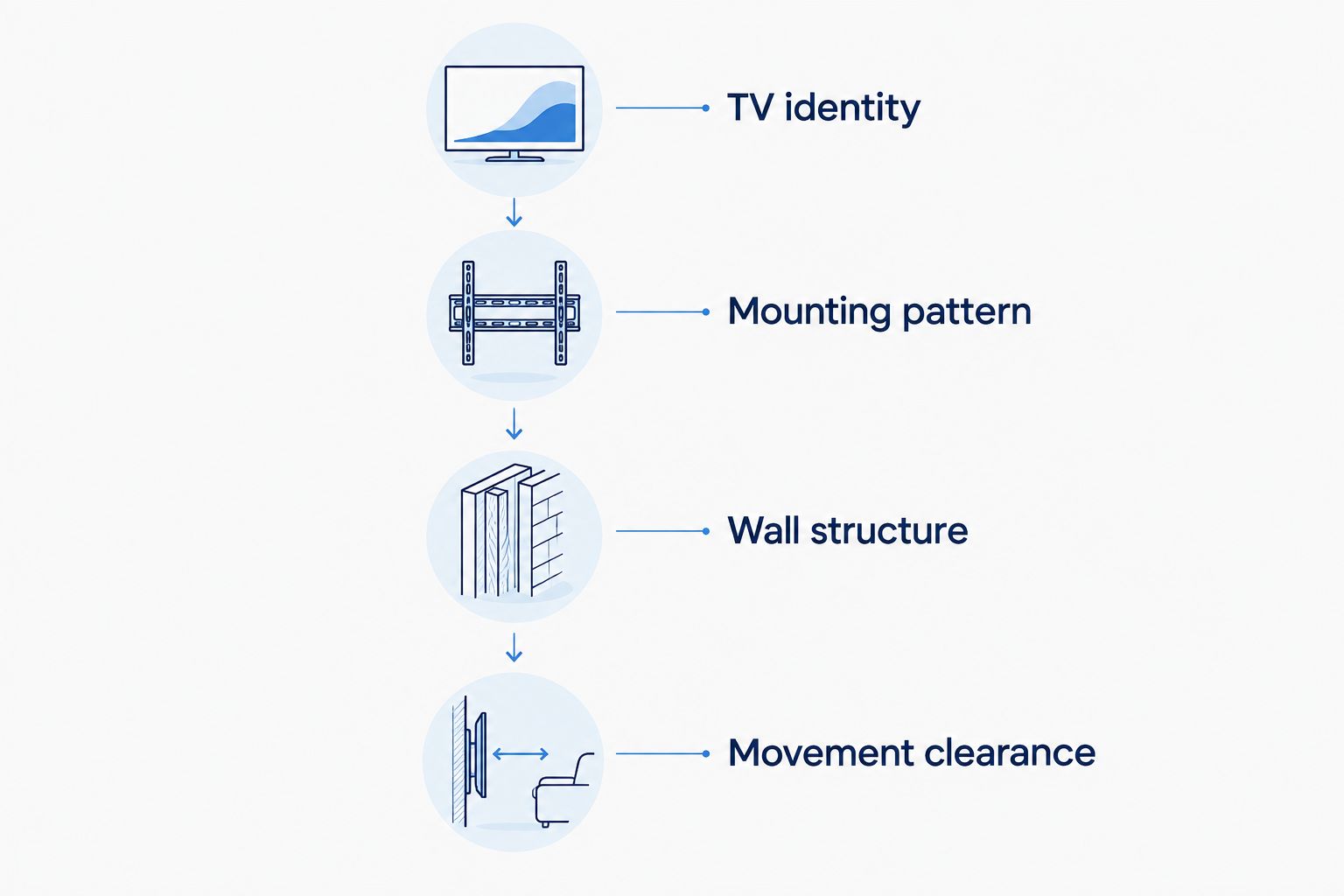
These checks belong together. A compatible mounting pattern does not establish wall suitability, and a secure wall attachment does not guarantee enough space for movement.
Set the installation scope before booking
A successful TV-mounting appointment starts with a defined job. Send the television model, intended location, wall details, and mount model before agreeing to the work.
Ask Bestlinktek to confirm the TV installation scope for your address. Keep these responsibilities explicit:
- Mount supply: Establish whether you or the service provider supplies the bracket and required hardware.
- Cable routing: Distinguish visible cable organization from routing cables inside a wall.
- Power arrangements: Confirm how the television will receive power and whether separate electrical work is required.
- Wall finish: Establish whether patching, painting, or other repairs fall outside the agreed work.
- Final checks: Agree on checking the installed position, intended movement, and connected devices.
Do not assume that a service description includes every accessory or alteration. A clear scope protects your installation plan from mismatched expectations.
How these mount types are ranked
The ranking prioritizes TV fit and wall attachment first, then viewing adjustment, connection access, and installation scope. Tilting leads for straight-on viewing because it addresses vertical adjustment without requiring a full articulated movement path.
This is a category-selection guide, not a product test or a claim that every bracket within a category performs identically. Your exact TV and room requirements determine the final choice.
Which large-screen TV mount should you choose?
Choose a tilting mount unless your room gives you a specific reason to choose another design. Move to full-motion for changing viewing directions, fixed for a settled close-to-wall arrangement, or pull-down for a verified height-adjustment requirement.
For your 2026 installation, write down the viewing problem before comparing brackets. That single decision prevents useful features from becoming unnecessary requirements.
FAQ
What are the best TV mounts for large screens?
The best TV mounts for large screens match the television’s weight, mounting pattern, wall construction, and viewing needs. Start with tilting for straight-on viewing, full-motion for changing directions, or fixed for a permanent forward-facing position.
Is a full-motion mount better than a tilting mount?
Full-motion is better when you need to change the screen’s direction; tilting is better suited to straight-on viewing that needs vertical adjustment. Check clearance and cable movement before selecting full-motion.
Can I choose a TV mount by screen size alone?
No. Screen size alone does not establish weight compatibility, mounting-hole compatibility, or suitability for your wall. Check the exact television and mount instructions together.
What does VESA mean when buying a TV mount?
A VESA mounting pattern describes standardized mounting-hole spacing on a compatible display. Match the television’s documented horizontal and vertical spacing to the mount’s supported patterns, and follow the required screw and spacer instructions.
Should I use a pull-down mount above a fireplace?
Use a pull-down mount only after confirming the movement path, attachment requirements, and applicable heat clearances. A movable bracket does not override the television or fireplace installation instructions.
Does a TV installation service include the mount and hidden cables?
Do not assume the bracket or in-wall cable routing is included. Confirm hardware supply, cable-routing scope, power arrangements, and wall-finish exclusions before booking.
Can I book Bestlinktek TV installation anywhere in the US in 2026?
Confirm service availability for your address directly with Bestlinktek. The stated service area is Raleigh–Durham, North Carolina; national buying guidance does not establish nationwide booking coverage.
One last thing
Plan the next cable connection before you mount the television. Check whether you can reach the required ports or follow the bracket’s removal procedure without improvising.
A mount should support the way you use the screen after installation—not just the moment it first goes on the wall.